
Description
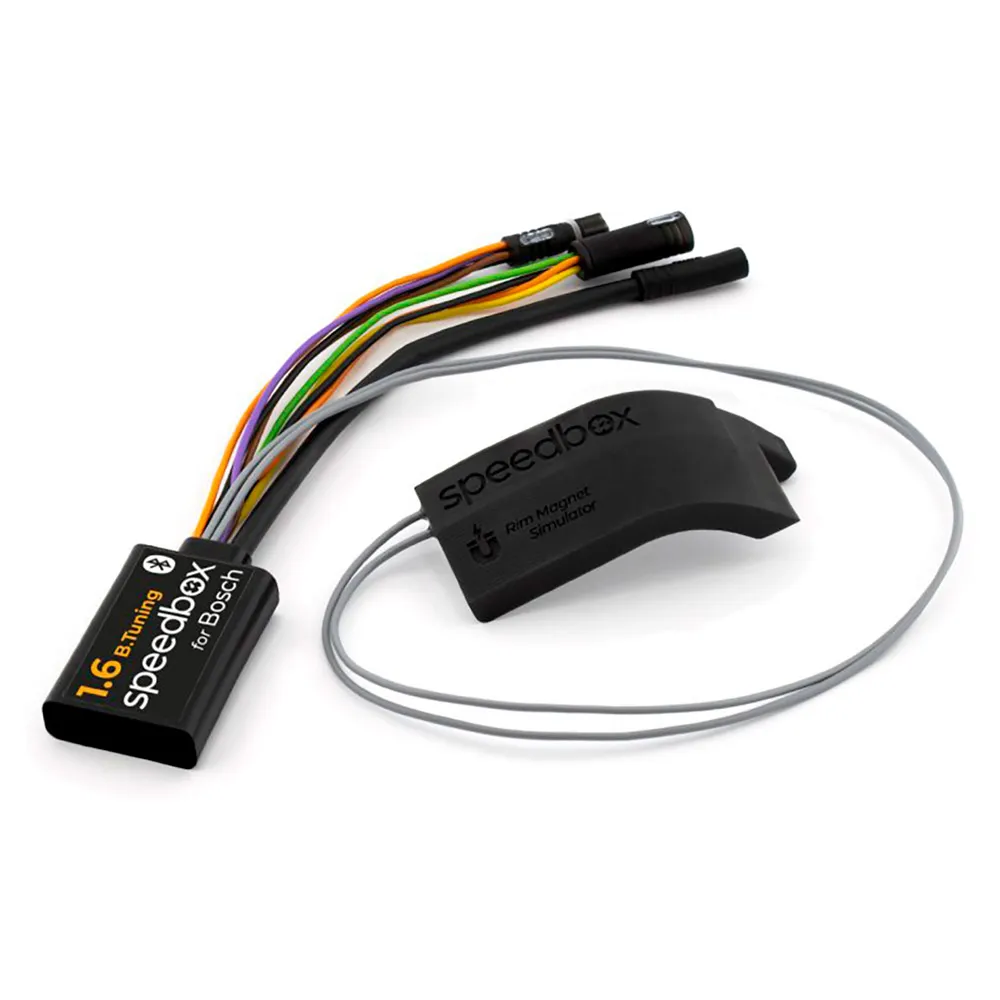
Tuning Chip with Bluetooth Technology and Mobile App for Your E-Bike with Bosch 5th Generation Motors with Smart System + ´´Rim Magnet´´.
Enjoy unlimited riding and all the advantages offered by the SpeedBox App.
SpeedBox 1.6 B.Tuning for Bosch provides a unique connection between your e-bike and your smartphone, allowing you to deactivate the speed limiter of your e-bike.
The actual speed and other ride data are correctly displayed in the SpeedBox App – directly on your phone screen.
How Does SpeedBox 1.6 B.Tuning for Bosch Work?.
To correctly activate all SpeedBox functions, once the e-bike is turned on with the SpeedBox installed, you must access the wheel circumference value in the menu if your e-bike has older firmware.
This chip is also very easy to use.
You can activate SpeedBox 1.6 B.Tuning either through the mobile app or on the e-bike display.
The display briefly shows 3.5 km/h (2.2 mph), and from that moment you can ride at a speed of 35 km/h.
You can change the default speed limit to any value (up to 99 km/h), but to minimize the risk of error codes, we recommend not exceeding 35 km/h.
To deactivate the chip, re-enable the WALK function (press and hold the ´´-´´ button).
The display will show 2.5 km/h (1.6 mph) and the 25 km/h speed limit will be restored.
The e-bike will function the same as before installing the chip.
We´ve also considered e-bikes without a working or available WALK function.
In that case, you can activate or deactivate tuning by pressing the buttons in the sequence:´´- + – +´´.
Tuning must always be activated or deactivated before riding, never during the ride!.
Using the SpeedBox App.
When launching the SpeedBox App for the first time, you´ll be asked to set a PIN.
You´ll use this PIN every time you run the app.
After setting the PIN, you´ll also be prompted to set a service password that can be used if you forget your PIN or want to change it.
Changing the Maximum Assist Speed.
The maximum assist speed can be changed by switching modes.
From TURBO down three levels and then up three levels.
eMTB – TOUR+ – ECO – TOUR+ – eMTB – TURBO.
The current speed limit will then be displayed.
To change the limit, briefly press the WALK function or rotate the wheel 360°.
2.5 km/h on the display corresponds to a 25 km/h limit, 3.5 to 35 km/h, etc.
The last displayed limit will be saved after 15 seconds of inactivity.
End of Ride Instructions.
When using SpeedBox, the e-bike must remain powered on after the ride until the display shows a steady 0.0 km/h.
During this phase, the display will show the remaining countdown time.
After that, the bike can be safely turned off and you´ll be ready for the next ride.
SpeedBox App for SpeedBox 1.6 B.Tuning for Bosch.
The SpeedBox App, specifically designed for SpeedBox 1.6 B.Tuning for Bosch, uses Bluetooth technology to connect your e-bike to your smartphone.
After downloading the app and pairing it with your bike, you´ll be able to view live data and ride parameters on your phone screen.
You can save ride data, compare it with friends, and track your performance – so you can enjoy the ride while leaving the analysis for later.
SpeedBox App Features.
Chip control.
Save and view ride data.
Set the maximum support speed.
Stealth mode.
Motor diagnostics.
Note:The SpeedBox 1.6 B.Tuning chip works independently of the SpeedBox App, but the app is a valuable accessory that gives you full insight into your performance.
Before ordering the SpeedBox 1.6 B.Tuning chip, download the SpeedBox App to your phone.
You can test the demo version, explore its features, and ensure the app runs correctly on your device.
To connect with the SpeedBox 1.6 B.Tuning chip, your phone must support Bluetooth version 4.0 or higher.
Installation.
To connect the SpeedBox chip to your e-bike, we use color-coded connectors with a locking key for proper connection – making installation very easy.
You can download step-by-step instructions or watch videos to guide you through the process.
Removing the chip is just as simple as installing it.
If you experience any connection issues, feel free to contact us.
If you want to install SpeedBox on a new bike, you must first ride at least 10 kilometers on it.
Important.
Connect the male and female connectors in the direction of the locking key.
Do not twist the connectors during connection!.
Warning.
Keep in mind that using modified e-bikes on public infrastructure may violate laws in some countries.
The manufacturer is not responsible for damages resulting from the use of SpeedBox products.
E-bikes equipped with SpeedBox must not be used on roads, bike paths, or public areas.
They are only intended for use on private property and at your own risk.
Using SpeedBox may void your e-bike´s warranty.
We recommend using additional protective equipment to prevent injury.
For short stops, keep one foot on the pedal to avoid starting the countdown.
For longer stops, allow at least a partial countdown.
After a long ride, the countdown may take several minutes.
Do not turn off the display until the countdown is complete.
Tuning should always be activated or deactivated before riding, never during the ride.
We recommend not exceeding 35 km/h.
We do not recommend updating the motor software.
Please disable automatic updates in the Ebike Flow app settings.
Reviews
There are no reviews yet.